Wastewater
How to Correct a DMR in NetDMR After You’ve Already Submitted It (2026)
ComplyFlo · October 26, 2026 · 5 min read
A guide for Texas WWTP operators: what NetDMR lets you fix after submission, and what to keep.

TL;DR
You can fix a DMR you already submitted, and the fix creates a new submission record for the same DMR.
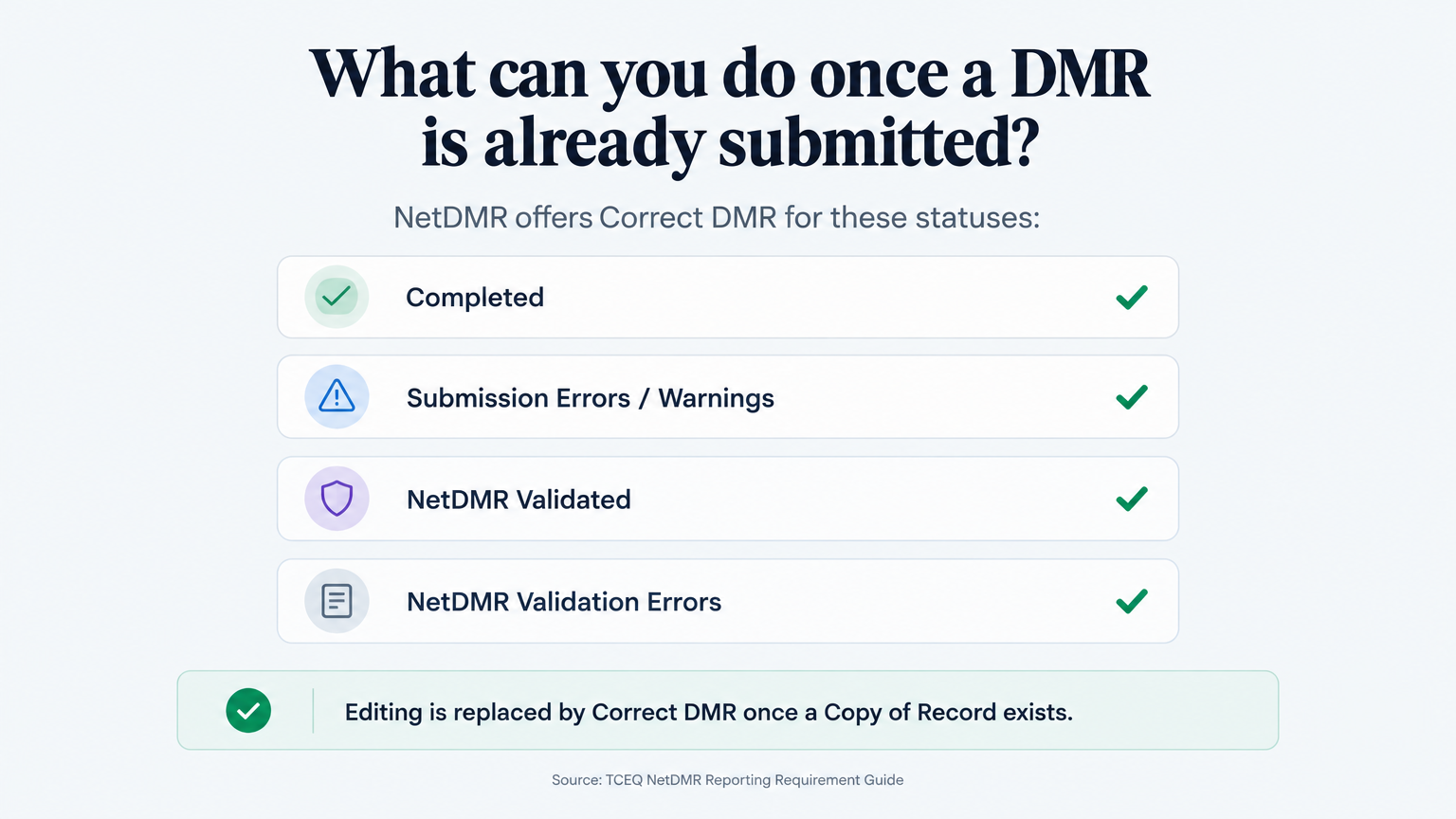
Correct, do not start over. NetDMR's Correct DMR option works on reports with a status of Completed, Submission Errors/Warnings, NetDMR Validated, or NetDMR Validation Errors (TCEQ).
Correction is a duty. If you discover that a submitted report contains incorrect information, submit the correction promptly and do not wait for the next reporting cycle (40 CFR §122.41(l)(8)).
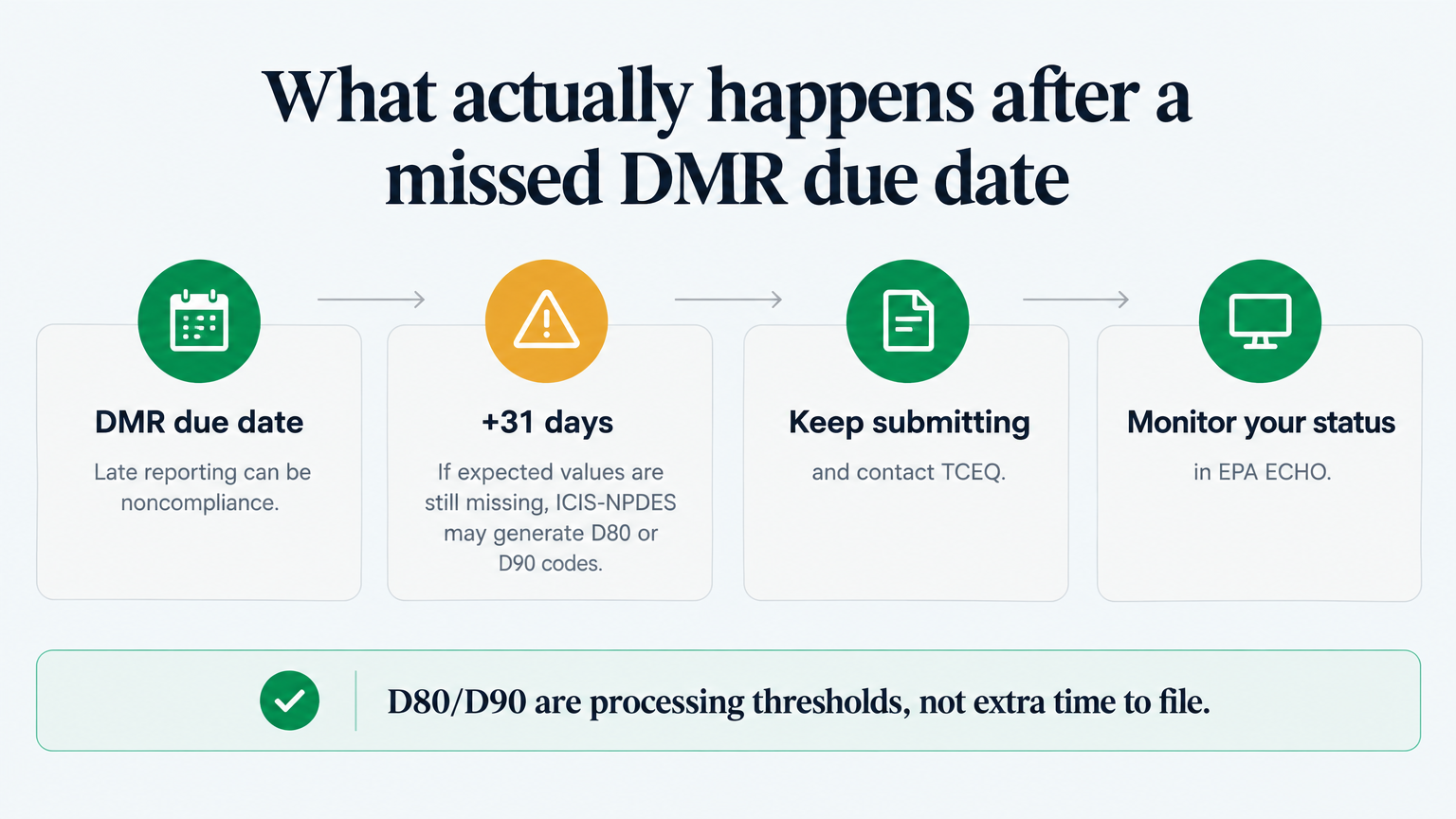
A late report is still fixable. Submit it as soon as you can; EPA's D80/D90 codes appear only if expected values are still missing 31 days after the due date.
Verify the date. TCEQ's calendar lists monthly wastewater DMRs as due on the 20th of the following month, but your permit controls (TCEQ).
Help! What do I do if I already submitted my DMR and then found a mistake?
You can still fix it, and you should do it promptly. NetDMR, the portal TCEQ requires for electronic reporting, lets you correct a submitted DMR (TCEQ).
Federal permit conditions make that a duty: a permittee that becomes aware it submitted incorrect information must promptly submit the correct information (40 CFR §122.41(l)(8)). Review any related notification or noncompliance-reporting requirements in your permit.
ComplyFlo is built around that reality: it prepares draft DMR reporting data from the readings your operators log all month, so month-end becomes a review rather than a scramble.
If the deadline is the worry, see TCEQ DMR Deadlines: When Your Report Is Due and What a Late Submission Actually Risks. If the form is unfamiliar, start with How to Fill Out a TCEQ DMR.
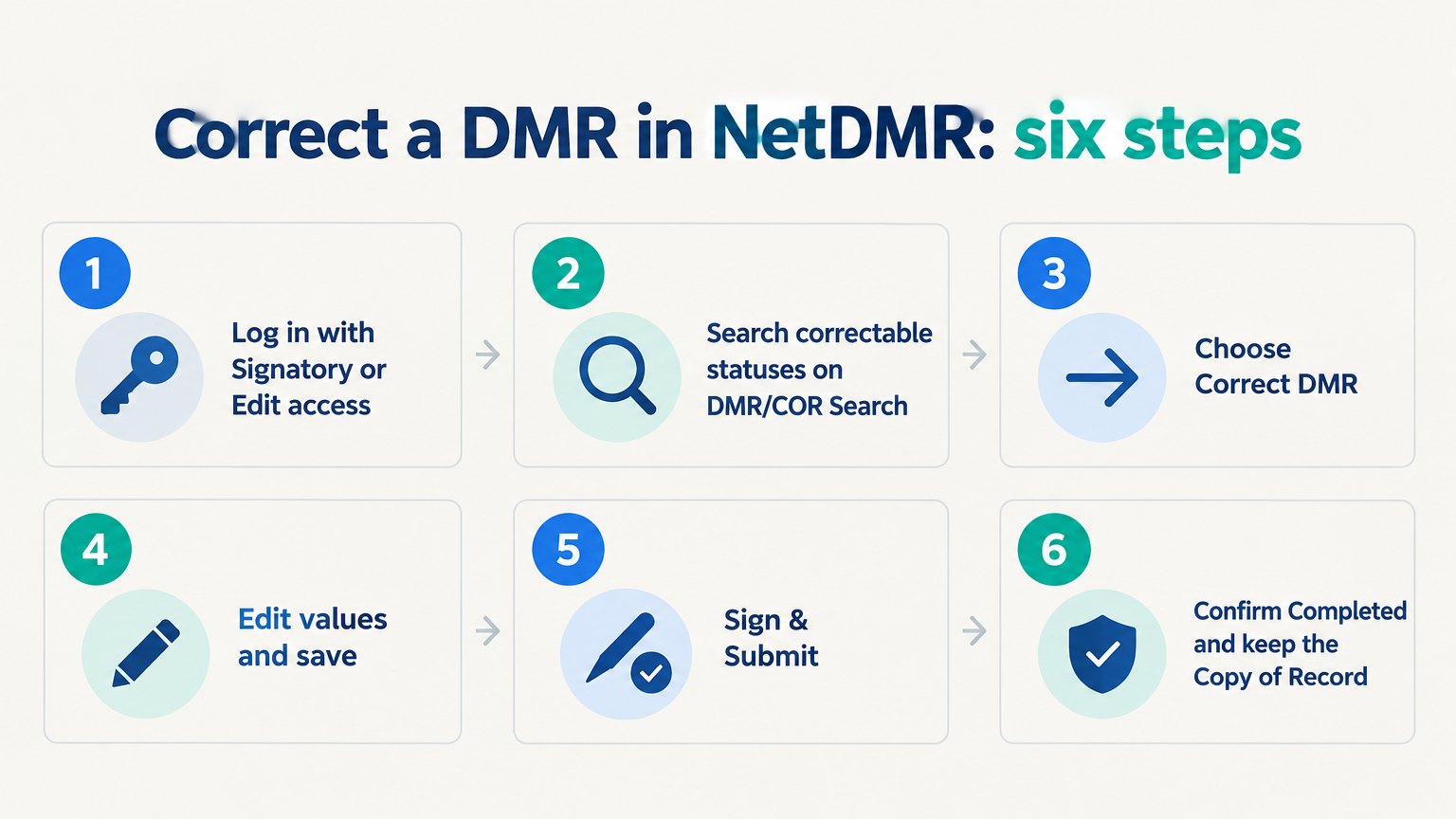
How do you correct a DMR in NetDMR, step by step?
NetDMR corrects a report you already signed and submitted through Correct DMR, rather than re-entering it. Plain Edit DMR is only for reports with no submitted Copy of Record (TCEQ).
Log in to NetDMR with a Signatory or Edit user account.
On the DMR/COR Search tab, select the correctable statuses in the box next to Status and enter any other search criteria.
Click Search. On the DMR/COR Search Results page, find the DMR, choose Correct DMR in the Next Steps column, and click Go.
On the Correct DMR page, edit the values and save. Resolve all hard errors, review any soft warnings, and acknowledge them only after confirming the reported information is accurate. Confirm the DMR reaches NetDMR Validated status before the authorized signatory signs and submits it. NetDMR brings in the values from the report's most recent Copy of Record.
If you are a signatory, click Sign & Submit, tick Include in Submission, answer the security question, enter your password, and click Submit. NetDMR generates a new Copy of Record.
Confirm the corrected DMR reaches Completed status. Review any submission errors or warnings, verify that required attachments were included, and retain the new submission confirmation and Copy of Record. Clicking Submit alone does not establish successful processing.
TCEQ defines Completed as signed, submitted, and accepted by ICIS-NPDES, so that status is your evidence of success (TCEQ). If you lack signatory access, tell the signatory the report is ready for signature (TCEQ).
These steps follow TCEQ's NetDMR Reporting Requirement Guide; labels can change, so confirm the current buttons in the portal.
Can you still submit a DMR that is already late?
Yes, and you should submit it as soon as you can, because a late report is better than a missing one. First, work out which situation you are in.
If the overdue DMR was never submitted, complete and submit it as its first submission.
If it already has a submitted Copy of Record, use Correct DMR to revise it (TCEQ).
Submitting late, or correcting the data, does not by itself erase an earlier reporting violation. Failure to submit, late submission, and incomplete DMRs are permit violations potentially subject to enforcement and penalties (EPA). If expected values are still missing 31 days after the due date, EPA's ICIS-NPDES can generate a D80 or D90 non-receipt code, a processing threshold and not extra time to file (EPA ECHO). Late or missing reporting can contribute to reportable or significant noncompliance, depending on the tracking criteria and resolution status (EPA).
Late, missing, or incomplete reporting can result in enforcement and applicable administrative or civil penalties. The amount depends on the statutory provision, the violation, and the circumstances (Texas Water Code §7.052 and §7.102).
Can a wrong number pass NetDMR's validation?
Yes. NetDMR's electronic validation catches hard errors, but it does not check whether a number is the right statistic.
Hard errors block submission: invalid characters, conflicting entries, and invalid NODI codes (EPA).
A wrong statistic can pass. An arithmetic average entered where the permit requires a geometric mean may satisfy validation without being correct (EPA).
Electronic validation is not the same as regulatory accuracy. Enter a required result, or an applicable, accurate No Data Indicator (NODI) code, in accordance with the permit and reporting instructions (EPA).
What should you keep after you correct or resubmit a DMR?
Keep the whole reporting history, not just the latest copy.
Retain the original and corrected Copies of Record, the submission confirmations, and the source records behind the corrected numbers (TCEQ).
Add a dated explanation of what changed and why, with explanatory comments or an attachment where appropriate or required (EPA).
Keep records for the period your permit requires, generally at least three years for wastewater monitoring records and reports, and longer where applicable (40 CFR §122.41(j)(2)).
What does the correction workflow look like, manual versus digital?
Manual correction means hunting through the spreadsheets and logbooks that produced the error.
Correction step | Manual | With ComplyFlo |
|---|---|---|
Capture the reading | Paper logbook, re-keyed later | Logged from a phone or tablet with the sample time |
Calculate the statistic | Hand or spreadsheet formulas | Calculated using permit-defined statistics |
Identify threshold exceptions | Noticed after the fact | Flagged against configured limits or thresholds when entered |
Build the corrected report | Rebuilt at the deadline | Draft DMR package prepared from approved readings for review |
Values within configured thresholds still require review against source records and permit-defined calculations. ComplyFlo builds a monthly DMR package from the readings entered through the month, in a NetDMR-ready format with one-click export, and supports review checkpoints before anything goes to NetDMR.

Frequently Asked Questions
Can you edit a DMR after it has been submitted in NetDMR?
Yes. Plain Edit DMR is only for a report with no submitted Copy of Record; otherwise use Correct DMR (TCEQ).
Is a corrected DMR treated as a new report?
No. It is the same DMR with a new Copy of Record, and the resubmitted data overrides the previous values. Earlier Copies of Record remain part of the report's submission history (TCEQ).
Can I still submit my DMR if it is late?
Yes, submit it as soon as you can. If it was never submitted, complete it as a first submission; if it has a Copy of Record, use Correct DMR. Late and missing DMRs are permit violations.
What happens if I leave a required field blank?
Leaving required reporting fields blank can produce validation errors or warnings and can result in an incomplete report. Enter the required result or an applicable, accurate NODI code, following the permit and reporting instructions. Acknowledging a warning does not make an incomplete report compliant (EPA).
Do I need to keep a copy of the corrected DMR?
Yes. Retain the original and corrected Copies of Record, the submission confirmations, and the source records behind the corrected numbers (TCEQ).
How do you make the next DMR easier to submit correctly the first time?
Clean data at the source is what keeps a correction rare. ComplyFlo prepares draft reporting data from your team's daily readings and builds the monthly DMR package for review before it reaches NetDMR.
Start with the free TPDES Permit Compliance Checklist, which covers permit-specific DMR submissions, sampling, SSO reporting, and renewal milestones. Then book a demo to see the DMR workspace on your own parameters.
Operators remain responsible for verifying conversions, completeness, report requirements, and final submission.
Free checklist
TPDES Permit Compliance Checklist
Review permit-specific DMR submissions, sampling, SSO reporting, renewal milestones, and applicable pretreatment responsibilities.
Ready to move your plant logs and reports off paper?
Book a free 1-hour demo with a ComplyFlo team member and see it running on your own workflow.
Book a free demoGet TCEQ compliance updates
Deadline reminders, rule changes, and practical guides for Texas waste operators. No spam — unsubscribe anytime.
By subscribing you agree to receive emails from ComplyFlo. See our privacy policy.