Wastewater
How to Fill Out a TCEQ DMR - Discharge Monitoring Report: A Plain-English Guide for Wastewater Operators
Most Texas WWTPs submit a DMR monthly, on the schedule their TPDES permit sets. Here's how to fill one out correctly - from reading your TPDES permit to submitting in NetDMR - without the legalese.
July 31, 2026 · 14 min read
TL;DR
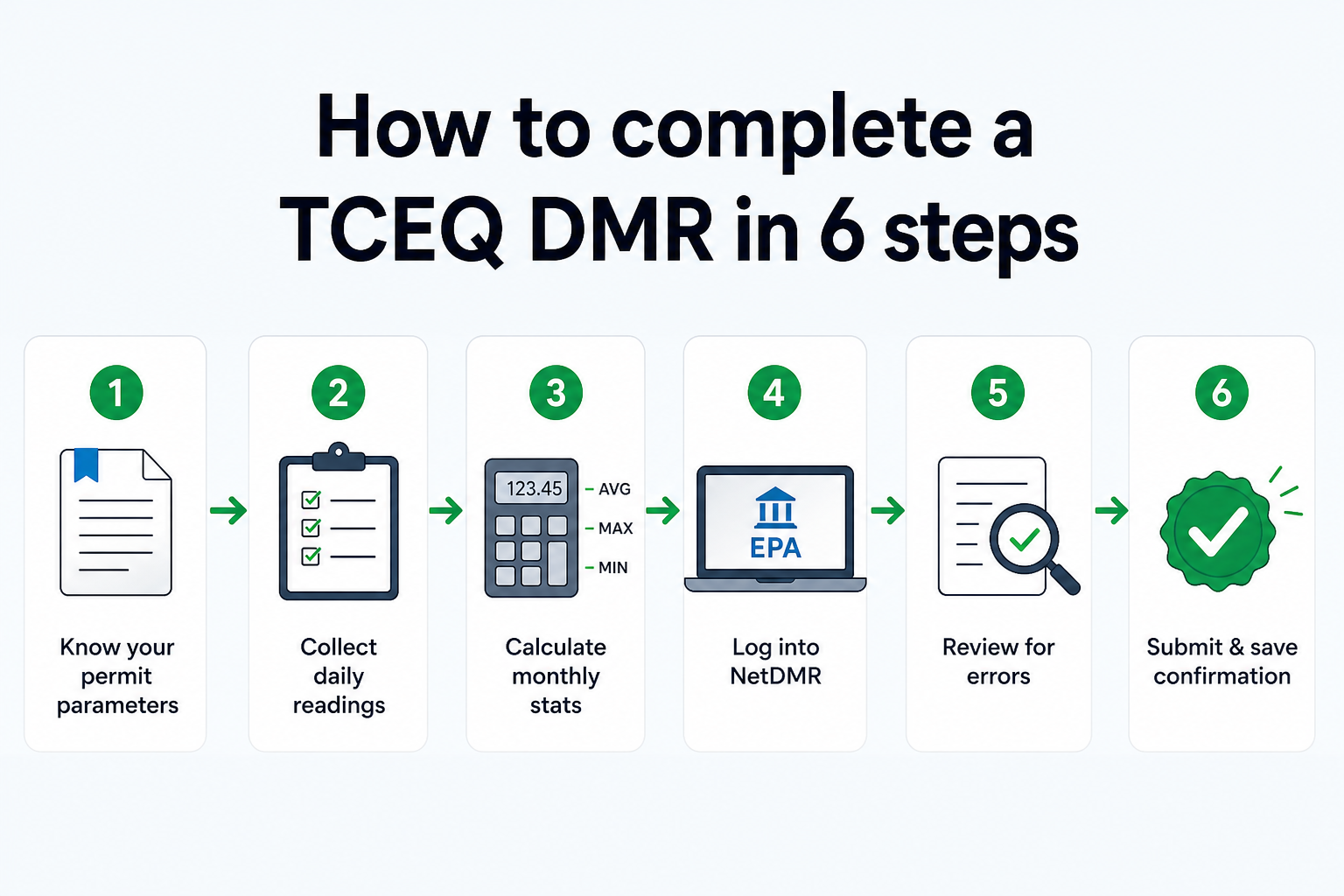
Every Texas wastewater treatment plant with a TPDES permit submits Discharge Monitoring Reports (DMRs) on the schedule its permit sets - monthly for most municipal plants, quarterly for some smaller or industrial dischargers. The report goes through NetDMR - the EPA's electronic filing portal - and must be validated, signed by an authorized signatory, and submitted by the due date in your permit. TCEQ's reporting calendar lists monthly wastewater DMRs as due on the 20th of the following month, and NetDMR shows the exact due date on each report. TCEQ's own documentation is thorough but dense; this guide translates it into plain steps for the operator filling out the form, not the compliance attorney writing the permit. The six things you need to do: know your permit parameters, collect your daily readings, calculate your monthly stats, log into NetDMR and enter the data, review for errors, and submit. If you're doing this from spreadsheets every month, ComplyFlo builds the DMR automatically from your daily readings - no month-end data scramble.
Why every Texas WWTP operator needs to get this right
The DMR is the primary compliance document between your facility and the state of Texas. Miss it, and you're out of compliance with your permit - TCEQ can issue a Notice of Violation. Submit incorrect numbers, and you've created a data integrity problem that can lead to enforcement and administrative or civil penalties - the amount depends on the statutory provision, the violation, and the circumstances (Texas Water Code §7.052 and §7.102) - along with permit modifications or, in serious cases, permit revocation.
The pressure is real. Most municipal plants report monthly, so you're doing this every month. The window is tight - TCEQ's reporting calendar lists January data as due February 20, though your permit and NetDMR show your exact date. And there's no grace period for "we're still compiling." EPA's system only flags a missing report 31 days after the due date (EPA ECHO), but that is a processing threshold, not an extension - the deadline is the deadline.
Here's the frustrating part: TCEQ and EPA have published guides, training videos, and fact sheets about NetDMR. But most of that documentation is written for compliance specialists and regulators, not for the Class B operator trying to get the DMR submitted before their shift ends on a Friday. This guide is for that operator.
What is a TCEQ DMR, and what makes it Texas-specific?
A Discharge Monitoring Report is a federally-required record that documents the quality and quantity of wastewater your facility discharged during a monitoring period. It's the paper trail that proves your plant operated within the limits set by your permit.
The federal framework comes from the Clean Water Act, which established the National Pollutant Discharge Elimination System (NPDES). In 1998, the EPA delegated NPDES oversight to the Texas Commission on Environmental Quality (TCEQ), which now runs the program under the name Texas Pollutant Discharge Elimination System, or TPDES.
Your TPDES permit sets the rules specific to your facility: which parameters you monitor, how often you sample, what your effluent limits are, and when you report. The DMR is how you prove each month that you stayed within those rules.
TCEQ requires electronic DMR submission. TPDES permit holders submit through NetDMR, the EPA's web-based filing system. Paper is accepted only if TCEQ approved an electronic reporting waiver (form TCEQ-20754) in advance - otherwise, NetDMR is mandatory.
Step 1: Know your TPDES permit parameters
Before you can fill out a DMR, you need to know exactly what your permit requires you to monitor. Pull up your TPDES permit and find the Monitoring and Reporting section. This is where you'll find:
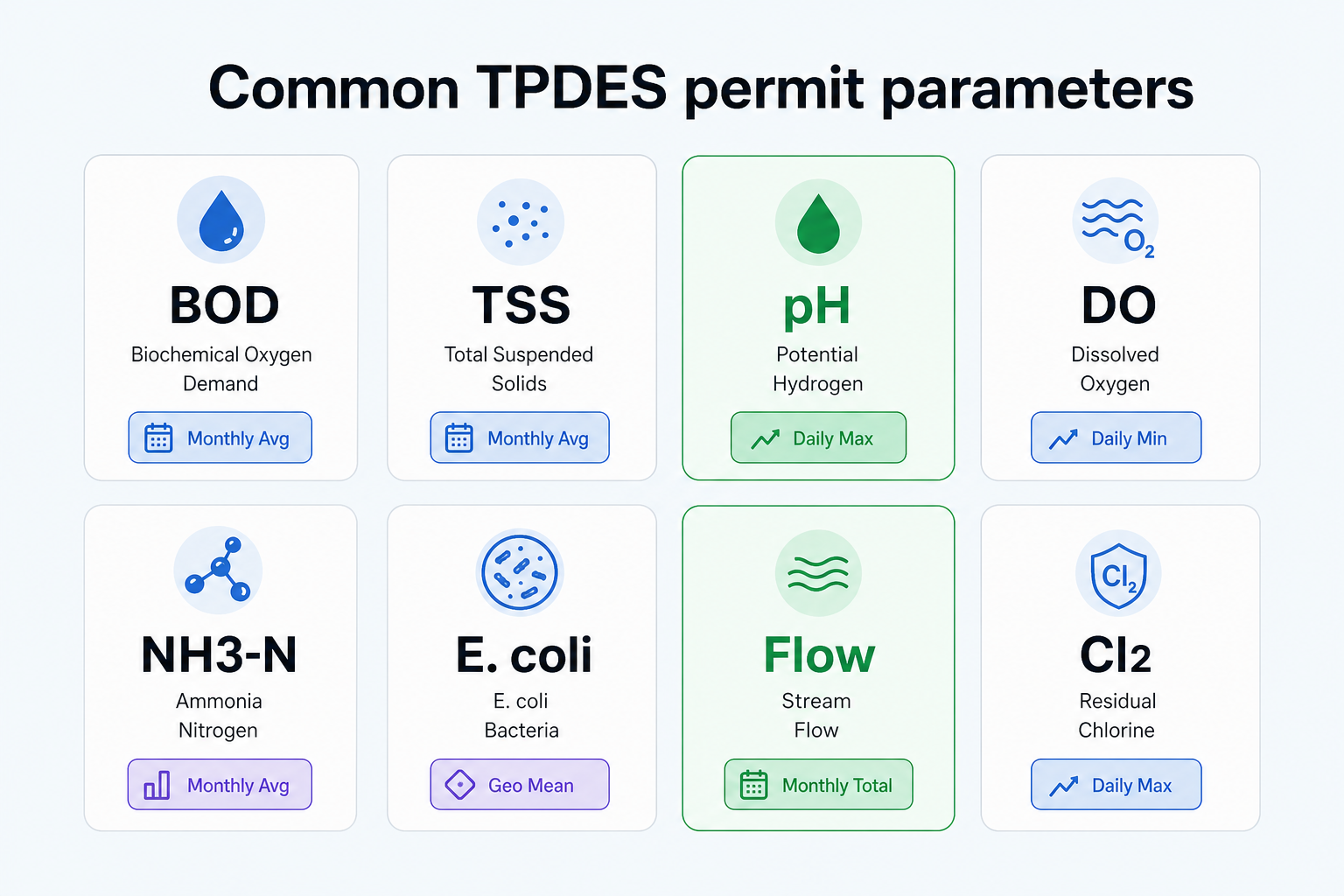
- Which parameters you're required to monitor - typically BOD, TSS, pH, DO, ammonia, E. coli or fecal coliform, flow, and chlorine residual, though your permit may include others
- How frequently you're required to sample - daily, weekly, monthly, quarterly, or some combination
- Which analytical methods are approved - you must use EPA-approved laboratory methods
- Your effluent limits - the maximum (and sometimes minimum) values your discharge can reach for each parameter
- What kind of average you need to report - monthly averages, weekly averages, daily maximums, or geometric means for bacteria
This step sounds obvious, but it's where a lot of errors originate. Two plants in the same town can have meaningfully different permit requirements. Don't assume your parameters match a neighboring facility's. Your permit is the only source of truth for what you're required to measure and report.
If you've misplaced your permit, TCEQ's data lookup tool lets you search for permit information by facility name or permit number.
Step 2: Gather your data - daily logs, lab results, flow readings
The DMR summarizes a full month of monitoring data. That data needs to be collected, organized, and verified before you can enter anything into NetDMR.
What you're pulling together
Daily parameter logs - Every reading your operators recorded during the monitoring period: DO, pH, temperature, chlorine residual, MLSS, and any other parameters your permit requires you to log daily. These should be in your plant's logbook or, if you've moved to digital, your parameter log system.
Lab results - BOD₅, TSS, ammonia, E. coli, and any other parameters requiring certified laboratory analysis. You need the actual lab report, not your notes from when the results came in. The lab report is your documentation if TCEQ asks to verify the data.
Flow readings - Daily flow in million gallons per day (MGD). Your flow meter should be recording this continuously; you need the daily average and daily maximum for the monitoring period. Total monthly flow (in millions of gallons) may also be required.
Biomonitoring data - If your permit requires quarterly toxicity testing, and the quarter falls in this reporting period, you'll need your lab's toxicity test results including the pass/fail determination.
The biggest time sink in this step
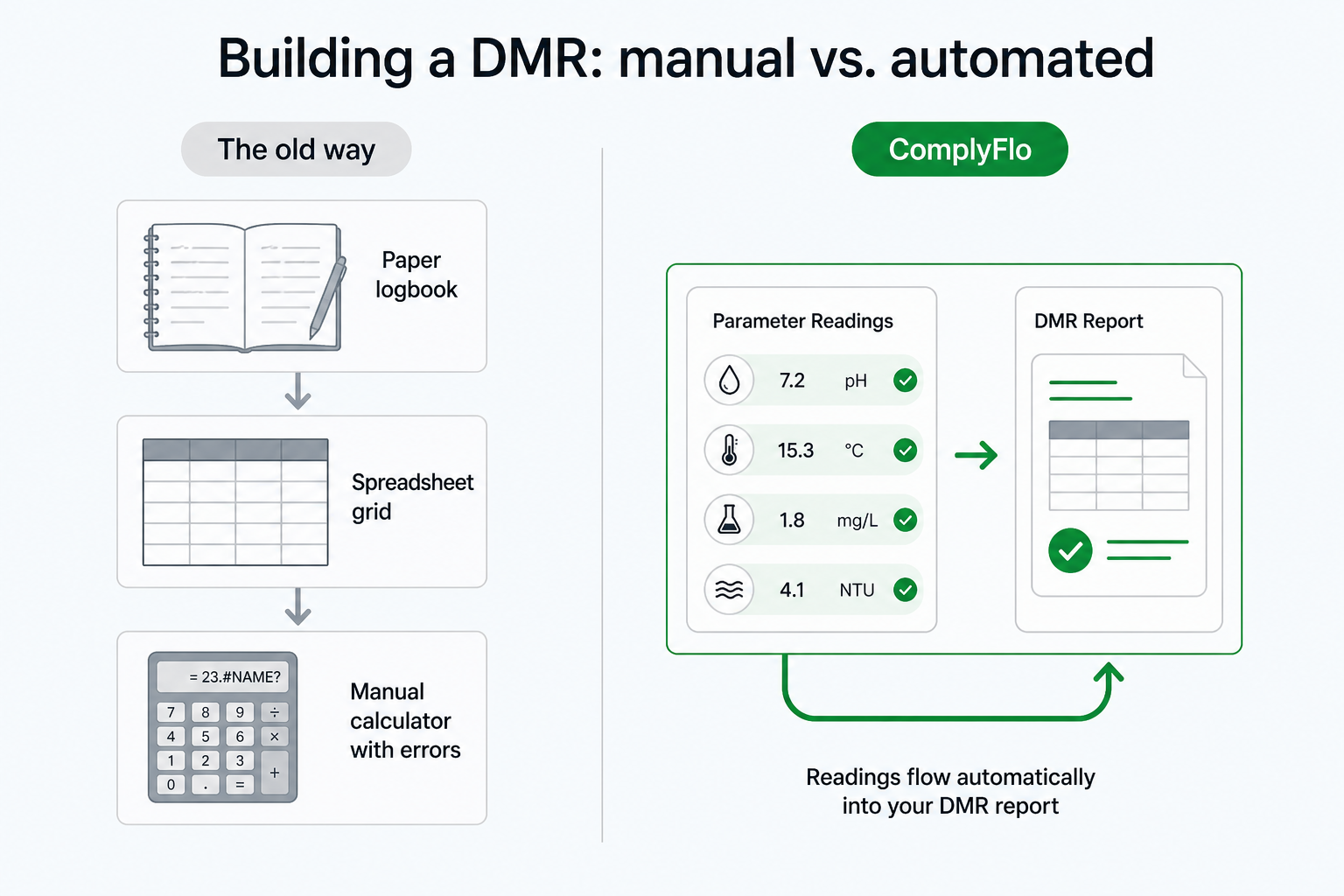
For most operators doing this manually, gathering data means pulling from multiple places: a paper logbook from the plant floor, a spreadsheet where someone keyed in the lab results, another spreadsheet for flow data, and possibly a separate folder of lab reports. If those sources don't reconcile - a reading in the logbook that doesn't match the spreadsheet - you're cross-checking by hand before you can proceed.
This is the step where month-end crunching happens, often under deadline pressure.
Step 3: Calculate your monthly statistics
Once you have all your raw data, you need to compute the summary statistics your permit requires you to report. NetDMR will flag errors if you enter the wrong type of summary for a parameter, so it's worth understanding what each calculation means.
Monthly average
Add all daily values and divide by the number of sample days. If you sampled BOD on four days and got 18, 22, 15, and 19 mg/L, your monthly average is (18 + 22 + 15 + 19) / 4 = 18.5 mg/L. This is the most common summary statistic for BOD, TSS, and ammonia.
Daily maximum
The single highest value recorded during the monitoring period. Scan your log for the peak reading. Some permits require you to report both the monthly average and the daily maximum for the same parameter.
Weekly average
Average of all samples collected within a single calendar week (Sunday through Saturday). If your permit requires weekly averages, you'll need to calculate them separately for each week in the reporting period, not just an average of the whole month.
Geometric mean (for E. coli and fecal coliform)
Bacterial indicators use a geometric mean instead of a simple average because bacterial counts are log-normally distributed - a few very high readings would skew a simple average far above the typical value. The geometric mean is calculated as: multiply all your E. coli values together, then take the Nth root where N is the total number of samples. For example, four E. coli samples of 20, 50, 80, and 200 CFU/100mL: (20 × 50 × 80 × 200)^(1/4) = (16,000,000)^0.25 ≈ 63 CFU/100mL.
If you're doing this by hand on a calculator, use the logarithm method: average the log of each value, then take the antilog of that average.
Percent removal
For BOD and TSS at facilities required to report treatment efficiency: ((Influent – Effluent) / Influent) × 100. Secondary treatment standards typically require ≥85% removal.
Flow
Daily average flow (in MGD) and daily maximum flow are typically required. Some permits also require total monthly flow in millions of gallons, which is the sum of daily average flows across the month.
Step 4: Log into NetDMR and enter your data
With your calculations done, you're ready for data entry in NetDMR. Here's how the system works.
Getting access if you don't have it yet
NetDMR is accessed through the EPA's Central Data Exchange (CDX) portal. You'll need to:
1. Create a CDX account at cdx.epa.gov if you don't have one
2. Add the NetDMR Program Service to your account using this EPA guide
3. Request the appropriate user role - most operators need either Data Entry or Preparer access; only authorized signatories need the Signatory role
4. Have your facility administrator or TCEQ confirm your access to your specific permit
If you're setting up access for the first time, allow a few days - role approvals aren't instant. Questions go to TCEQ's NetDMR helpline at NetDMR@tceq.texas.gov or 512-239-3367.
Finding your DMR to fill out
Once you're in NetDMR, search for DMRs by your permit number and monitoring period. The system will show you the DMR form that corresponds to your permit and the reporting period you need to complete. TCEQ has configured the form to match your permit - you'll see fields for exactly the parameters and summary types your permit requires.
Entering data
For each parameter, enter the values you calculated in Step 3 into the appropriate fields:
- Monthly averages go in the "Monthly Avg" column
- Daily maximums go in the "Daily Max" column
- Geometric means for bacteria go in their designated field
- Flow data goes in the flow section, reported in MGD
- Never leave a required field blank - enter the result, or the applicable No Data Indicator (NODI) code, such as "No Discharge" if there was no discharge during the monitoring period
NetDMR performs automatic validation as you enter data. Hard errors must be corrected before you can submit - these are flagged in red and typically indicate a value outside the plausible range for a parameter, or a required field left blank. Soft errors are warnings you can override by providing an explanation - these flag values that are unusual but not necessarily wrong. You can find EPA's guidance on correcting hard and soft errors in the NetDMR support portal.
Step 5: Review for common errors before you submit
Before you hit submit, run through this checklist. These are the mistakes that generate NOVs and correction requests from TCEQ.
Calculation errors
The most common: wrong daily average (divided by total days in the month instead of sample days), incorrect geometric mean for bacteria, missing a data point because it was in a different folder. Double-check that each calculated value matches your source records.
Wrong reporting period
NetDMR shows you the monitoring period on the form. Verify it matches the data you're entering. Submitting January's data into February's form is a real error that happens under deadline pressure.
Missing required fields
Every parameter your permit requires must be reported. If you sampled less frequently than required - for example, your permit says weekly but you only have three weeks of data - that's a compliance gap you need to document and address, not a blank to leave.
Limit exceedances not documented
If any parameter exceeded its permit limit during the monitoring period, enter the actual value. Do not leave it blank or enter the limit value. The DMR documents what actually happened - exceedances are reported, not hidden. If you exceeded a limit, you may have additional reporting obligations (such as an SSO report); contact TCEQ to understand your requirements.
Missing or unauthorized signature
The DMR is not submitted until it's electronically signed by an authorized signatory. The signatory certifies under penalty of law that the information is true and accurate. A DMR that's been entered but not signed is not a submitted DMR. Make sure the right person signs before the deadline - this is a step that gets missed when the person doing data entry and the person authorized to sign are different staff members.
Step 6: Submit and save your confirmation
Once you've resolved all hard errors and the authorized signatory has electronically signed the DMR, submit it. NetDMR will generate a submission confirmation and a Copy of Record - save them. The confirmation includes a timestamp and a reference number that proves you submitted on time if TCEQ ever asks.
Keep your supporting documentation - raw lab reports, daily logs, calibration records - for at least three years. TCEQ can request records going back three years during an inspection.
How long this actually takes
Here's the honest picture for a typical municipal WWTP doing this manually:
Task | Estimated Time (manual) | |
|---|---|---|
Pulling data from logbooks and spreadsheets | 45 - 90 minutes | |
Cross-checking and reconciling discrepancies | 30 - 60 minutes | |
Calculating monthly statistics | 30 - 45 minutes | |
Entering data into NetDMR | 30 - 45 minutes | |
Reviewing and correcting errors | 15 - 30 minutes | |
Getting signature and submitting | 15 - 30 minutes | |
Total | 2.5 to 5 hours per month |
That's a conservative estimate for a plant with no data discrepancies and an operator who's done it many times before. For a newer operator, or a month with unusual readings or limit exceedances, add more time.
Over a year, you're spending 30 to 60 hours on a single monthly compliance task. That time doesn't account for the cognitive load of doing this under deadline with the knowledge that an error can generate a formal violation.
Common mistakes that generate TCEQ violations
We've touched on errors throughout the steps above. Here's the consolidated list of what actually gets plants into trouble, drawn from EPA's DMR compliance advisory and the NetDMR error documentation:
Wrong calculation type - Reporting a simple average where your permit requires a geometric mean (most often for E. coli), or reporting a daily maximum where a monthly average is required.
Averaging over total calendar days instead of sample days - If you sampled on 4 days in February, your monthly average divides by 4, not by 28.
Not reporting a parameter at all - If your permit requires monitoring and you didn't sample, that's a monitoring violation separate from any limit violation. Report what you have and document why monitoring wasn't completed.
Entering the permit limit instead of the actual value - This is a data integrity violation. Enter what you measured.
Late submission - NetDMR shows you the due date. A late DMR is noncompliance as soon as the deadline passes - even before EPA's system generates a D80/D90 non-receipt code 31 days later (EPA ECHO). If you know you're going to miss a deadline due to extenuating circumstances, contact TCEQ proactively before the deadline, not after.
Unsigned submission attempt - Saving or validating a draft in NetDMR does not constitute submission. The authorized signatory must electronically sign and submit it, and you should keep the Copy of Record.
Biomonitoring gaps - If your permit requires quarterly toxicity testing and you didn't conduct it during the required quarter, that's a monitoring violation. Toxicity tests require advance scheduling with a certified lab; don't try to schedule them in the last week of the quarter.
How to fill out a TCEQ DMR: the 6-step visual
TCEQ resources worth bookmarking
- TCEQ NetDMR main page - The starting point for everything NetDMR in Texas
- NetDMR training and resources - EPA fact sheets, how-to guides, and training modules
- NetDMR Reporting Requirement Guide (PDF) - The official guide for searching, editing, and submitting DMRs
- TCEQ NetDMR contact page - NetDMR@tceq.texas.gov or 512-239-3367
- EPA CDX portal - Where you create your account and access NetDMR
- EPA NetDMR support portal - How-to articles for common tasks in NetDMR
- TCEQ data lookup - Find your permit information
ComplyFlo
ComplyFlo builds your DMR from your daily readings automatically.

Everything in this guide - collecting daily readings, calculating monthly averages, tracking limit exceedances, generating a NetDMR-ready package - happens automatically inside ComplyFlo. Operators log DO, pH, TSS, ammonia, flow, and other parameters directly from the plant floor. The platform's process calculators compute SVI, F/M ratio, BOD removal efficiency, SRT, and HRT from live readings without a spreadsheet. At the end of the month, your DMR package is ready with one click - formatted for NetDMR, with monthly averages, daily maximums, geometric means, and percent removal already calculated.
ComplyFlo also tracks permit milestones - next DMR due date, TPDES renewal window, upcoming sampling events, operator CEU deadlines - so the deadline isn't a surprise. And if a reading exceeds a permit limit, the dashboard flags it in red the moment it's entered, not at the end of the month when you're pulling the DMR together.
The platform is built for Texas wastewater operators, not national generalists. TPDES permit structure, NetDMR parameter support, and TCEQ-specific compliance tools are the core product, not features bolted on after the fact.
Book a demo to see ComplyFlo running on your actual parameters and permit requirements.
Frequently Asked Questions
When is a TCEQ DMR due each month?
Your TPDES permit sets the due date, and NetDMR shows the exact "DMR Due Date" on each report. TCEQ's reporting calendar lists monthly wastewater DMRs as due on the 20th of the following month, so January results are due February 20. Always verify the date in your permit and NetDMR - an individual permit can set a different day.
What is NetDMR and do I have to use it?
NetDMR is the EPA's web-based electronic reporting portal for Discharge Monitoring Reports, accessed through the EPA Central Data Exchange (CDX). TCEQ requires electronic submission, and paper is accepted only if TCEQ approved a waiver (form TCEQ-20754) in advance. Everyone else submits through NetDMR. You'll need to create a CDX account and request the NetDMR Program Service before you can enter any data.
How do I calculate the monthly average for BOD or TSS on my DMR?
Add up all daily values for the parameter during the monitoring period, then divide by the number of sample days. For example, if you sampled BOD on 4 days and got 18, 22, 15, and 19 mg/L, your monthly average is (18+22+15+19)/4 = 18.5 mg/L. Note that E. coli and fecal coliform use a geometric mean instead of a simple average - multiply all values together, then take the Nth root where N is the number of samples. Tools like ComplyFlo calculate these automatically from your daily log entries.
What happens if I miss a DMR deadline or submit incorrect data?
Missing or late DMRs are permit violations, even before EPA's system generates a non-receipt code 31 days after the due date. TCEQ can issue Notices of Violation and pursue enforcement with administrative or civil penalties; the amount depends on the statutory provision, the violation, and the circumstances (Texas Water Code §7.052 and §7.102). Submitting knowingly inaccurate data is a more serious data integrity violation and can lead to permit revocation, mandatory corrective actions, and in extreme cases, criminal prosecution. If you realize you submitted incorrect data, contact TCEQ NetDMR support immediately at NetDMR@tceq.texas.gov to discuss correction options.
Can I automate my TCEQ DMR instead of building it from a spreadsheet every month?
Yes. ComplyFlo is built specifically for Texas wastewater operators and generates your monthly DMR package automatically from your daily parameter readings. Instead of pulling data from multiple spreadsheets at the end of the month, every reading you enter during the month feeds the DMR in real time. One-click export gives you a NetDMR-ready package. The platform also tracks permit milestones, calculates process parameters like SVI and F/M ratio, and alerts you to out-of-range readings before they become violations.
Free checklist
TPDES Permit Compliance Checklist
Review permit-specific DMR submissions, sampling, SSO reporting, renewal milestones, and applicable pretreatment responsibilities.
Ready to move your plant logs and reports off paper?
Book a free 1-hour demo with a ComplyFlo team member and see it running on your own workflow.
Book a free demoGet TCEQ compliance updates
Deadline reminders, rule changes, and practical guides for Texas waste operators. No spam — unsubscribe anytime.
By subscribing you agree to receive emails from ComplyFlo. See our privacy policy.