Everything your site needs.
Nothing it doesn't.
From the moment a truck pulls up to the final invoice — ComplyFlo is the intelligent layer between your gate and the regulators. We organize the paperwork, run the math, and prepare the quarterly and annual TCEQ reports MSW disposal sites are required to file — quarterly reports throughout the year, plus the annual report covering the Sep 1–Aug 31 fiscal year (due November 10).
We reduce human error in data organization and formatting. Your team retains responsibility for data accuracy and all submissions to environmental agencies.
Book a demoReal-time operations visibility
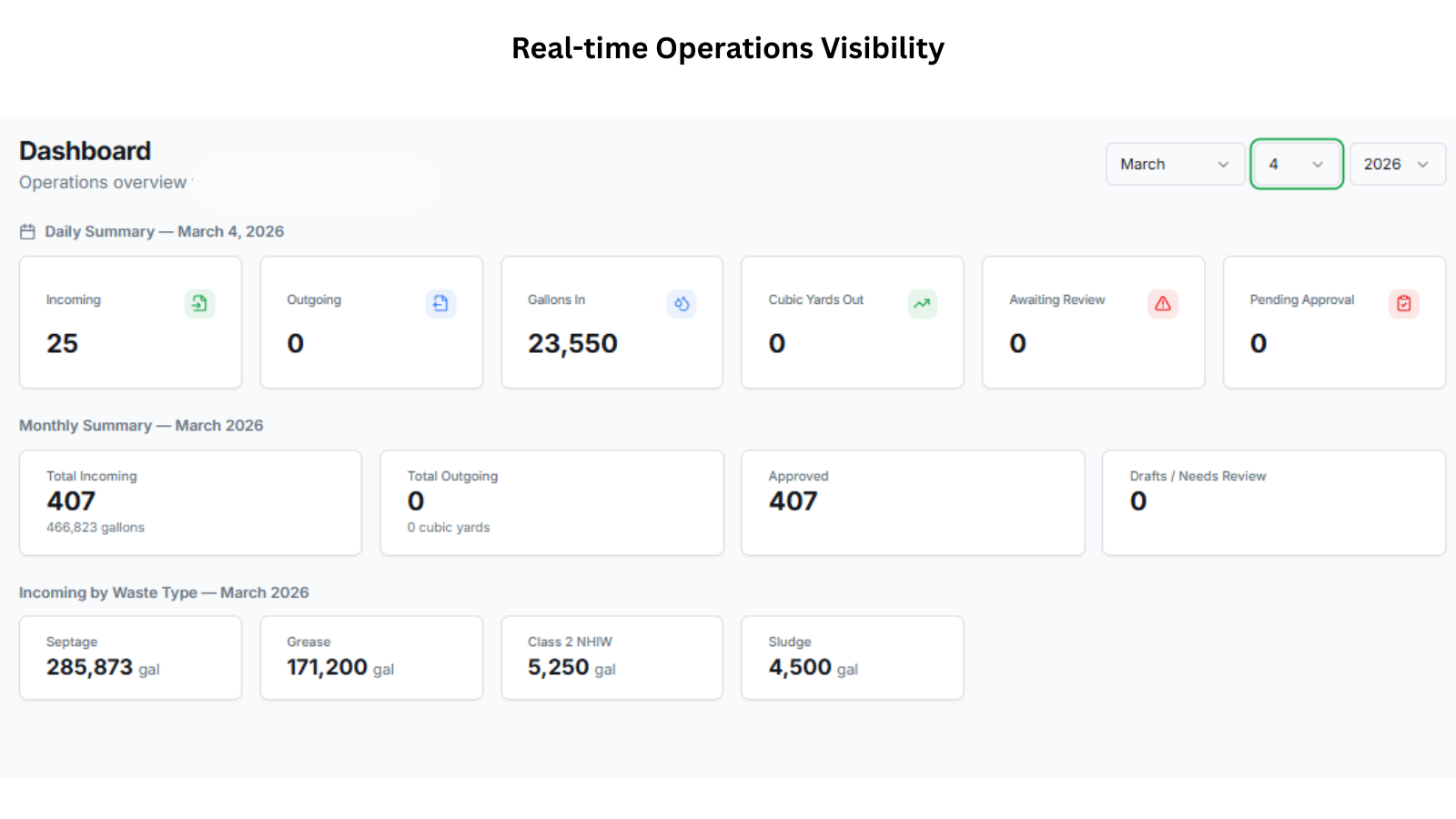
Everything happening at your site — in one dashboard.
The ComplyFlo Operations Dashboard gives every role — from gate attendants to accounting — an instant view of daily activity, monthly totals, and anything that needs attention. No more calling the office to ask how many trucks came in today.
- Daily summary auto-updates as manifests are scanned and approved throughout the day
- Monthly totals by waste type tracked separately by load and tonnage
- Review flags surface immediately — nothing awaiting approval gets buried in a paper stack
Scan it. Let AI read it.
Store it forever.
Paper manifests aren't going away — regulators require them. But the data inside them no longer has to live on paper. ComplyFlo turns any manifest photograph into a validated, locked digital record in minutes.
Operator uses a phone or tablet to photograph the paper manifest — or uploads a scan. Any manifest, any hauler format.
AI reads handwriting, checked boxes, stamps, and typed text — pulling every required field automatically into the form.
Operator reviews AI output. Low-confidence fields are flagged. Mismatches against the daily log trigger instant alerts.
On save, the manifest locks and feeds the daily log, compliance reports, and billing — automatically, with zero re-entry.
"Today someone takes that daily hand-written log and adds it to a spreadsheet to track for reporting. With ComplyFlo, that step is gone."
— ComplyFlo, built for Elmendorf WWTP
The log that writes itself.
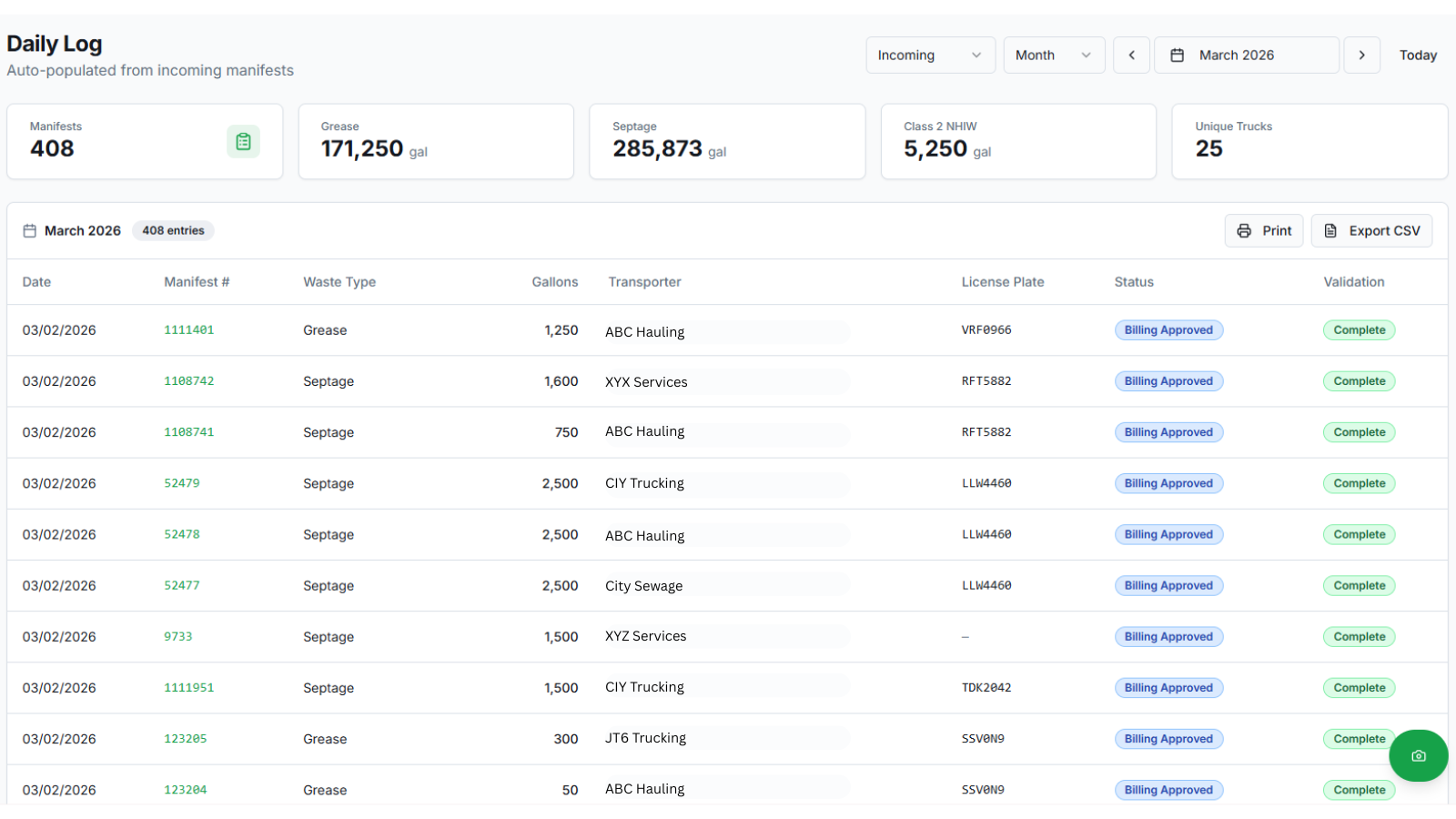
Every manifest scanned and approved automatically posts to the daily log — no operator re-entry, no spreadsheet, no end-of-day catch-up. By the time the last truck leaves, the log is already complete.
- Auto-populated from every approved incoming manifest
- Monthly totals by waste type calculated in real time
- Unique truck count and manifest count tracked automatically
- Every record linked back to its source manifest — one click away
- Printable and CSV-exportable for any date range
Daily Log for Your Waste Facility — March 2026. 408 manifests, 285,873 gallons of septage, 171,250 gallons of grease, 5,250 gallons of Class 2 NHIW, and 25 unique trucks — all auto-populated from scanned manifests. Status and validation columns confirm every record has cleared both review checkpoints.
Swipe the screenshot to see the full log →
Before vs. after
What the daily log used to cost your team.
This is the workflow ComplyFlo eliminates entirely.
- Operator hand-writes each truck entry into a paper daily log throughout the shift
- Log is picked up by accounting at end of day — or later
- Accounting manually re-keys every entry into a spreadsheet
- Monthly totals calculated by hand from spreadsheet rows
- Transcription errors go undetected until reporting time — if ever
- No way to cross-check the log against the actual paper manifests
- Log populates automatically as each manifest is scanned and approved
- Accounting sees live data the moment it's entered — no pickup required
- Zero re-keying — data flows from manifest directly to log to reports
- Monthly totals calculate in real time, broken out by waste type
- AI cross-validates every manifest against the log at time of entry
- Every log row links directly to its source manifest for instant audit
Nothing gets locked
until a human signs off.
Every manifest passes through two mandatory review checkpoints — operator first, then billing and admin. The review queue is where your team verifies accuracy, before data ever reaches a report or an invoice.
The operator opens the manifest in the review queue, sees the original paper document side-by-side with AI-extracted fields, and corrects anything that's wrong. Once satisfied, they finalize the record.
Moves to: Awaiting Admin ApprovalAdmin reviews the operator-confirmed record, verifies load details for billing accuracy, and grants final approval. Once approved, the record locks permanently and feeds reports and invoices.
Moves to: Billing Approved + LockedWhat makes this different
Built to catch errors before they become compliance problems.
Most systems trust the data entry. ComplyFlo doesn't. Every manifest is reviewed against the original paper source — by two different people, at two different stages.
The photographed paper manifest is permanently stored and displayed beside the digital record during review. Reviewers never have to hunt for the original — it's right there.
Always traceable to source.Operators can only finalize their own entries within the 24-hour edit window. Billing and admin approval is a separate step, visible only to authorized roles. No one can approve their own work past the operator stage.
Role-enforced at the database level.Admins can select and approve multiple manifests in a single action — ideal for end-of-day or end-of-week batch processing. Each approval is logged in the audit trail individually.
Efficient without skipping steps.Every edit, approval, and status change is recorded in a permanent audit log — who did what, when. Admins can review the full history of any manifest at any time.
Once a manifest clears admin approval, it locks. Operators cannot touch it. Only an admin can re-open a locked record — and that action is logged. The integrity of approved data is protected.
The review queue header shows exactly how many manifests are awaiting operator review and how many are awaiting admin approval. Nothing gets buried. Nothing goes unnoticed.
Quarterly & annual reporting
used to take days.
MSW disposal sites don't just file the annual TCEQ report — they're also required to submit quarterly reports throughout the year. ComplyFlo handles both. Every gallon received, every cubic yard sent out, every county it came from — tracked in real time across the Sep 1–Aug 31 fiscal year, so when a quarterly deadline or the November 10 annual due date arrives, your data is already done.
Wastewater plants file monthly DMRs instead — see the Wastewater Treatment Plants page for that workflow.
- ✓Quarterly TCEQ reports — required filings covered in addition to the annual report
- ✓Five report types — received waste, counties, outgoing, by transporter, and billing
- ✓Annual report covers the fiscal year Sep 1 – Aug 31, matching TCEQ's required reporting period
- ✓Gallons auto-converted to tons using the TCEQ-mandated formula
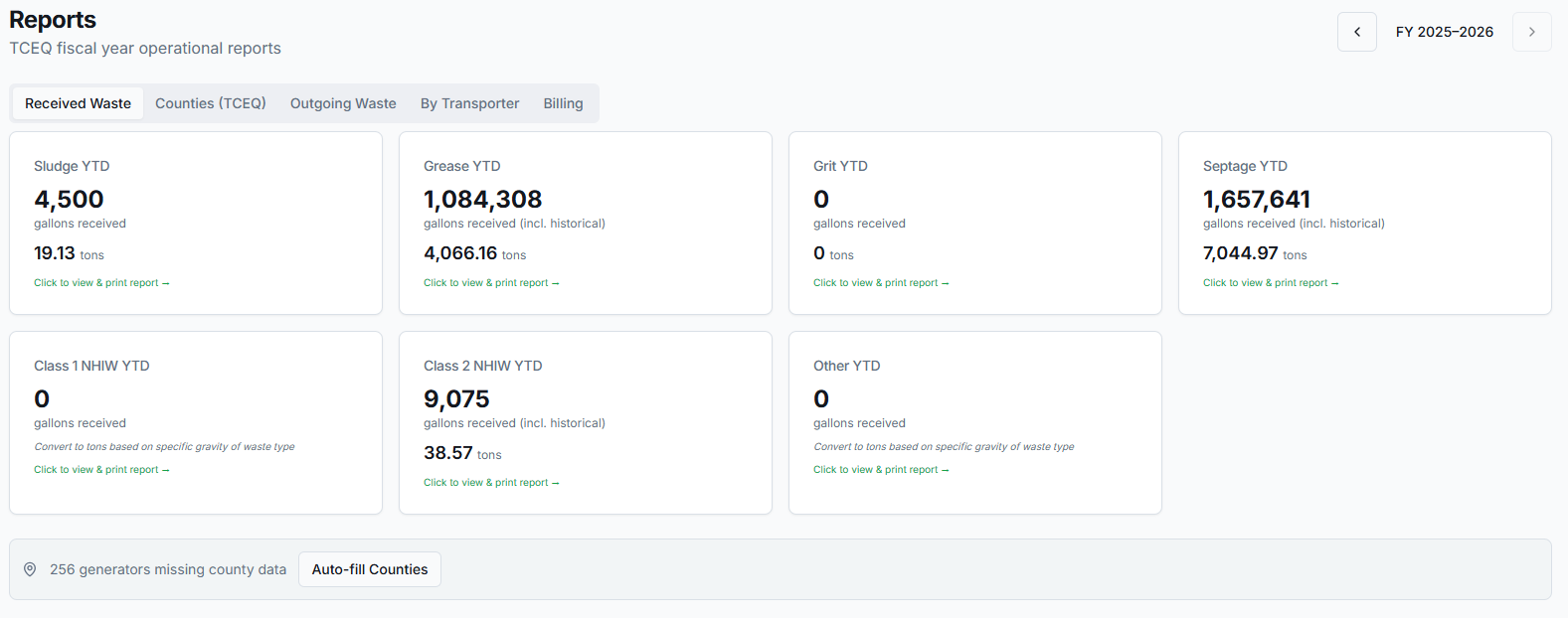
- ✓YTD totals broken out by every waste type — sludge, grease, grit, septage, NHIW
- ✓Historical data included — import pre-app records so your full year is complete
- ✓One-click view, print, and export — no spreadsheet required
TCEQ Reports dashboard — FY 2025–2026. Received Waste tab showing YTD totals by waste type. Septage leads at 1,657,641 gallons (7,044.97 tons), followed by grease at 1,084,308 gallons (4,066.16 tons) and Class 2 NHIW at 9,075 gallons (38.57 tons). Each card links directly to the full printable monthly report. The auto-fill counties button resolves missing county data from generator addresses in one click.
TCEQ requires outgoing waste to be reported in tons, not gallons or cubic yards. ComplyFlo applies the exact mandated conversion formula to every outgoing load — automatically — so your submission numbers are always correct and consistent with what the regulator expects.
From manifest to
paid invoice — automatically.
Every load that enters ComplyFlo is already a billable record. No re-keying into QuickBooks. No spreadsheet lookups. No chasing down rates. When the manifest is approved, billing is ready to go — one click to bill, one click to send.
"We caught a $5,000 billing error before it went out. The operator logged the wrong waste type — ComplyFlo flagged the mismatch before billing ran. That's the system working exactly as designed."
— ComplyFlo, Elmendorf WWTP · May 2026
The old way vs. ComplyFlo
Billing used to be a five-step manual process.
Now it's one click.
Here's what billing a single hauler delivery actually costs your team today — and what it costs with ComplyFlo.
- ✕Manually look up the manifest to find waste type, gallons, and transporter
- ✕Open a spreadsheet to find the customer's rate for that product
- ✕Calculate the charge manually — gallons × rate — risk of input errors
- ✕Open your accounting software, create an invoice, fill in all fields again from scratch
- ✕Email the invoice manually and wait for the customer to pay
- ✕Come back and update the spreadsheet to mark it as billed
- ✕Chase overdue invoices with no automated reminders
- ✕No real-time visibility into what's outstanding until someone checks
- ✓Manifest approved → billing record auto-created with all fields populated
- ✓Rate pulled automatically from customer rate card — no lookup needed
- ✓Gallons × rate calculated instantly, verified against the manifest
- ✓Click Bill → Stripe charges the saved payment method automatically
- ✓Invoice generated, numbered, and sent — no manual email
- ✓Status updates to Paid automatically when Stripe confirms
- ✓Overdue reminders sent automatically at 3, 7, and 30 days
- ✓Real-time A/R dashboard shows everything outstanding at a glance
All payment setup, card entry, and bank account details are handled entirely on Stripe's hosted pages. ComplyFlo stores only Stripe reference IDs — never card numbers, routing numbers, CVVs, or account numbers. Payment state is synced automatically via Stripe webhooks, so billing records are always current. Stripe is PCI-compliant. Your data — and your customers' data — stays that way.
Free checklist
Sludge Transporter Trip Ticket Checklist
Review required fields, signatures, generator copies, five-year retention, annual summaries, and significant-discrepancy procedures.
MSW disposal is now in beta.
See how ComplyFlo can support your MSW disposal operation, from manifest intake through reporting and billing.
Book a demo