Smart routing. Digital manifests.
Built for the truck.
ComplyFlo is the intelligent layer between hauler operations and regulatory submission — AI-powered route planning, mobile-first driver workflows, and compliance tools, whether you're hauling septage to a treatment plant or used cooking oil to a refinery.
We reduce human error in data organization and formatting. Haulers and their drivers retain responsibility for data accuracy and all submissions to environmental agencies.
Septage, sludge, grit, grease — manifest tracking, TCEQ reporting, and customer billing included.
TCEQ compliance + billingUsed cooking oil collection and refinery delivery — routing and inventory, no manifests or TCEQ required.
Routing + inventorySome operators run both. ComplyFlo handles both — in the same app, with a simple mode toggle.
Multi-module capableYour customer list is yours. ComplyFlo does not use it for its own marketing, sales prospecting, or solicitation. Disposal sites retain full manifests and customer/generator lists for required TCEQ audits.
How it worksStop planning routes
by hand. Let AI do it.
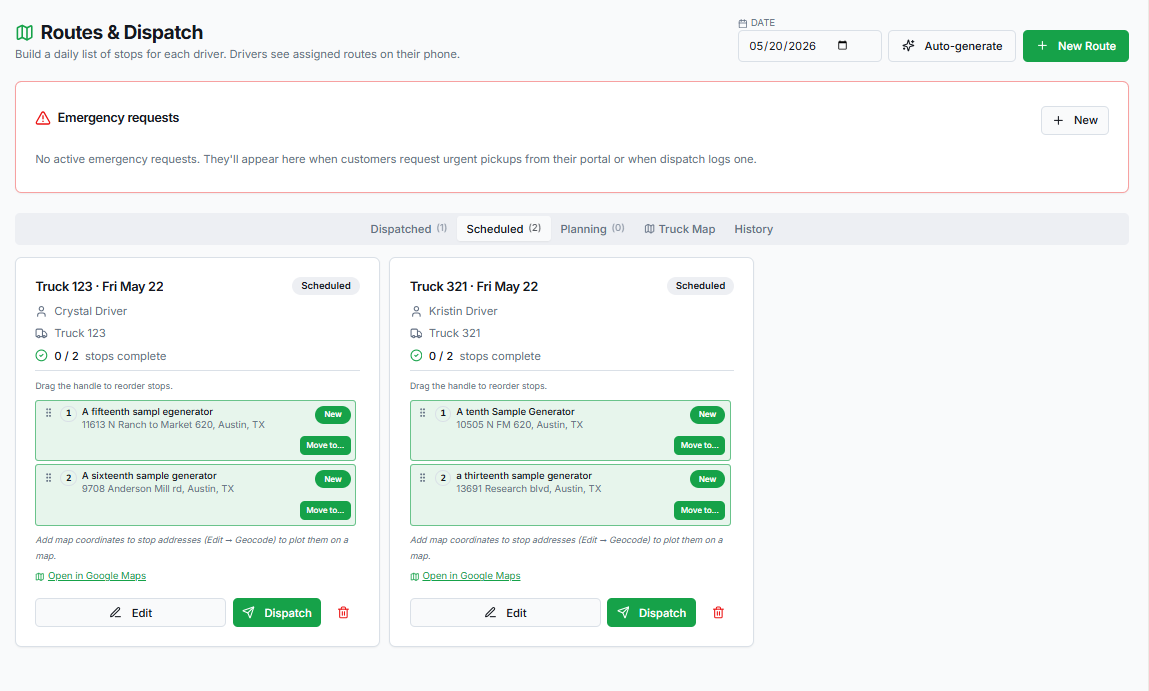
Every Sunday morning, ComplyFlo's AI routing agent builds your entire week's route plan — assigning trucks, drivers, stops, and sequences based on customer schedules, tank capacities, territories, and waste types. You review, adjust, and publish. Done.
- ✓Weekly route plans auto-generated every Sunday — ready to review before Monday
- ✓AI considers truck capacity, waste type restrictions, driver territory, and service frequency
- ✓Emergency pickups inserted into the best active or upcoming route automatically
- ✓Routes auto-dispatched daily to drivers once scheduled — no manual hand-off
- ✓Live interactive map shows all trucks, stops, and urgency levels in real time
- ✓GPS route tracking auto-enables when the truck is moving — no driver action needed
- ✓Routes are editable before publishing — AI suggests, you decide
MSW Hauler Features
Manifest tracking and TCEQ compliance — built in, not bolted on.
MSW haulers face the same regulatory requirements as the treatment plants they deliver to. ComplyFlo gives haulers the same manifest digitization, review workflows, and TCEQ reporting that plants already use — extended to the hauling operation.
Same AI OCR used by plants — extracts generator, waste type, gallons, manifest number, disposal facility, driver, truck, and dates from any paper manifest photograph.
Driver-submitted manifests enter the Driver Review Queue first. Admin reviews and approves before the record feeds reports and billing. Same lifecycle used by plants — applied to hauler operations.
Received waste by type, disposal site totals, truck and driver breakdowns, and county-of-origin reports — all formatted for TCEQ submission. Hauler fiscal year runs Jun 1 – May 31, aligned to the hauler operating calendar.
Choose per customer (or company-wide) how billing happens: drivers can charge the generator the moment a pickup is complete from the truck, or the record can route to the office for review and invoicing later. Rate cards, Stripe processing, net terms, customer portal, and automated reminders included either way.
Driver logs build automatically as routes are completed. Company-wide daily view for admins. Driver-level view for individual records. Manifest numbers, gallons, waste types, mileage, and disposal totals all captured.
Pickup volume trends, disposal site totals, route volume by week, and hauler-specific analytics replace the plant-focused graphs when Hauler Mode is active. Fiscal year view included.
UCO Hauler Features
Used cooking oil is a different business.
ComplyFlo knows the difference.
UCO haulers don't file manifests or report to TCEQ — but they need everything else. Smart routing, driver workflow, inventory tracking, and the unique revenue model where generators get paid, not billed.
You don't charge generators. You pay them.
UCO haulers earn revenue by selling cleaned grease to refiners who convert it to biodiesel, then pay a percentage back to the restaurants and generators they collected from. ComplyFlo's UCO mode reflects this model — no customer invoicing, no billing module. Instead, inventory tracking, water saturation estimates, and refinery delivery records.
Revenue comes from the refiner, not the generator. Payout to generators is calculated as a percentage of the sale price after water saturation adjustment.
Log estimated water saturation percentage for each pickup. Track grease inventory by storage tank until a full truckload is ready for refinery delivery.
Log each delivery to the refiner — volume, date, facility, and sale amount. Calculate generator payouts as a percentage of the sale price automatically.
AI route planning, live dispatch map, driver workflow, GPS tracking, and emergency pickup handling are identical for UCO haulers. The routing doesn't change — the compliance does.
UCO mode hides all compliance reporting, TCEQ exports, and manifest workflows. The features you don't need are never in your way.
UCO drivers use the same mobile workflow as MSW drivers — assigned routes, pickup confirmation, photos, and disposal logging — without the manifest step.
Generators can view scheduled pickups, see job photos, track payout history, and message the hauler — all from a simple mobile-friendly customer portal.
Customer Portal
Generators get a portal too.
Less phone tag for your office.
Every generator on the hauler's account gets a mobile-friendly customer portal — built to take the routine calls off your dispatcher's plate. Emergency requests, off-schedule pickups, pickup history, photos, manifests, and invoice payment — all self-service.
Generators tap Request Emergency Pickup in the portal. An SMS alert blasts to every contact on the hauler's emergency list, and the request is auto-prioritized into the best active or upcoming route. No voicemails. No missed calls. No dispatcher bottleneck.
Need an extra pickup outside the normal route? Generators pick a date and submit a request from the portal. It drops into the dispatcher's queue and is folded into the next available route — no phone tag required.
Generators see a full pickup history — dates, gallons, waste type, driver, and truck. Each pickup includes the completion photo, the GPS arrival/departure timestamps, and (for MSW haulers) the photographed manifest for that load.
Generators view current and historical invoices, download statements, and see exactly what was charged for each pickup. No more emailing the office to ask "what's my balance?"
Generators pay open invoices directly through the Stripe-hosted customer portal. Payment methods can be saved for one-click pay or auto-pay. The hauler never touches card data — Stripe handles it end-to-end.
Generators can message dispatch directly from the portal — questions about a pickup, a billing line item, or a service change. Messages are tied to the customer record so context is never lost.
For MSW haulers, every pickup record in the customer portal includes the photographed manifest for that load. Generators get instant access to their own compliance paper trail — without ever calling the office to request a copy.
Free checklist
Texas Grease Trap Manifest Checklist
Check transporter registration, manifest fields, authorized disposal, record distribution, and jurisdiction-specific retention requirements.
MSW haulers are now in beta.
Book a demo for MSW hauler operations. UCO haulers can still email us to join the beta waitlist.